Look around before you sign up
Your club, out of the notebook
Choose a group, find a pupil, and open a booking to see its dates and balance.
Interactive example · Fictional pupils and payments · No account needed
Your example group
Monday art club
Mondays, 16:00–17:00 · Studio room
Pupils on your list4
Booked for the block3
Payments recorded£60.00
Still to collect£60.00
Pupils in this group
Save names first. Add parent details and book pupils into classes when you’re ready.
- Alex MorganParent: Jordan MorganBooked · 4 classes
- Maya PatelParent: Priya PatelBooked · 4 classes
- Sam ReedParent: Taylor ReedBooked · 4 classes
- Jamie LeeParent details not added yetList onlyNo booking or charge yet
A pupil list is a starting point. Jamie is saved on the list, but has no class booking or balance. Booking a pupil and recording money are separate steps.
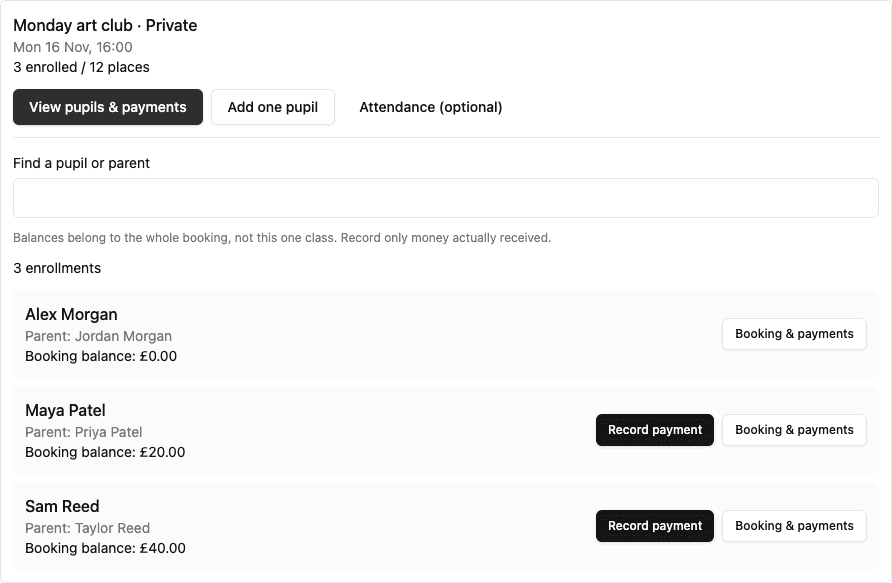
See the actual ClubDesk workspace
The real class screen, shown with fictional pupils and balances.
Start with your own group
This example stays separate. Your workspace starts with your own pupils and records.
A hand with your first group
Bring one group. We’ll help you get started.
Using a notebook or spreadsheet? We can help you set up one group, bring across your pupil list, and check its dates, bookings and balances together.
Keep your usual way of collecting payments. Online booking can wait.
Help me move my first groupNo account needed to ask.